Microsoft Teams
Covers the SystemChannelTeams records Brain Station 23 owns: the Azure App
credentials every organization's bots run on, the bot pool that lets multiple
Azure App Registrations coexist, and the OAuth consent flows those credentials
drive. For the per-organization bot setup (Azure app registration, console
walkthrough, deployment errors), see
Channels → Microsoft Teams.
app_id: Azure Application (client) IDapp_password: Azure client secret, stored encryptedtenant_id: Azure Directory (tenant) IDdeveloper_website_url: required, must start withhttps://
1. Fields
| Field | Type | Constraints |
|---|---|---|
app_id | string | required, ≤100 chars |
app_password | text | required |
tenant_id | string | required, ≤100 chars |
developer_name | string | required, ≤32 chars, default NeuraFlow |
developer_website_url | string | required, ≤500 chars, must start with https:// |
mpn_id | string | optional, ≤10 chars |
bot_scopes | JSON array | default ["personal", "team", "groupChat"] |
organization_id | UUID | optional; see org scoping |
name | string | display name, ≤100 chars, default Default Bot |
is_primary | bool | set by the server, not the client |
developer_name, developer_website_url, mpn_id and bot_scopes feed the
Teams app manifest generated per bot. They are not OAuth scopes.
bot_scopes is the manifest's bots[].scopes array (personal chat / team /
group chat contexts a user can add the bot in), unrelated to the Graph API
permission scopes used for consent below.
validate_bot_data rejects developer_name over 32 chars, mpn_id over 10
chars, and developer_website_url not starting with https://, on both
create and update (422).
2. Bot pool
More than one system config can exist. Base path
/api/v1/system/channels/teams.
- The first config created becomes primary automatically.
is_primarycannot be changed afterwards, and the primary cannot be deleted. - Every later config is non-primary and must be created with at least one
organizationIdsentry. Creating a non-primary with none returns 422, as does giving the primary any. - Assignments live in a separate
OrganizationBotAssignmenttable, not theorganization_idcolumn on the config row. The column is a different mechanism: setting it scopes the config to one organization for listing, and has no effect on/available. GET /available?organizationId=returns the primary plus configs assigned to that org, minus any the org has already used.- Deleting a config that a
ChannelTeamsrow still references returns 400.
Routes require an authenticated user and nothing more. There is no role check.
3. Authorization
Each ChannelTeams bot picks a system config (explicitly, or the primary if
none is set) and that config's app_id / app_password / tenant_id are
what Microsoft's OAuth endpoints authenticate against. Three independent
consents, built from MSGraphClient:
| Consent | Scopes | Microsoft endpoint |
|---|---|---|
| Chat | Chat.Create, User.Read.All | /{tenant}/adminconsent |
| Push | TeamsAppInstallation.ReadWriteForUser.All | /{tenant}/adminconsent |
| Catalog | AppCatalog.ReadWrite.All, offline_access, openid, profile, email | /{tenant}/oauth2/v2.0/authorize?prompt=consent |
Chat and push are Application-permission, tenant-wide admin consent: the
admin approves once and it applies org-wide. Catalog is delegated: the admin
signs in, and the resulting token (with a refresh token, since
offline_access is requested) is stored against the bot and expires.
NeuraFlow-side endpoints that start each flow: POST /channels/teams/oauth/authorize (chat), POST /channels/teams/oauth/push/authorize (push), POST /channels/teams/oauth/catalog/authorize (catalog). Callbacks land on
/channels/teams/oauth/callback and /channels/teams/oauth/catalog/callback,
both registered as redirect URIs on the Azure app (see
Channels → Microsoft Teams §1.2).
The consent walkthrough from the admin's perspective, and the deployment
error table, are documented there. This page only covers what credentials
and scopes drive the flow.
The catalog consent's scope string, as actually sent by the authorize
endpoint, includes openid profile email in addition to
AppCatalog.ReadWrite.All offline_access. MSGraphClient.CATALOG_SCOPES
only lists the latter two. The catalog authorize route builds its own
scope string rather than calling generate_authorization_url(). Documented
here as the scopes actually requested at runtime.
What the admin sees
With every permission from the tables above granted at once, the consent screen lists seven entries:
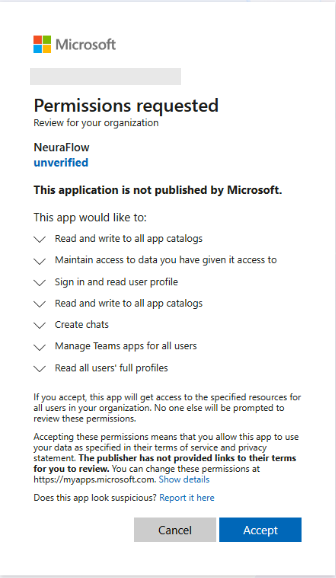
Each line maps back to a configured permission:
| On screen | Permission |
|---|---|
| Create chats | Chat.Create |
| Read all users' full profiles | User.Read.All |
| Read and write to all app catalogs | AppCatalog.ReadWrite.All (Application) |
| Read and write to all app catalogs | AppCatalog.ReadWrite.All (Delegated) |
| Manage Teams apps for all users | TeamsAppInstallation.ReadWriteForUser.All |
| Sign in and read user profile | openid, profile, email |
| Maintain access to data you have given it access to | offline_access |
AppCatalog.ReadWrite.All appears twice because it is requested as both an
Application and a Delegated permission. This is expected, not a duplicate.
Granting only the mandatory chat consent produces a shorter list: Create chats and Read all users' full profiles only.
Publisher verification
The screen above reads unverified and carries the warning This application is not published by Microsoft, because publisher verification has not been completed on the app registration. A verified publisher renders the company name with a badge instead:
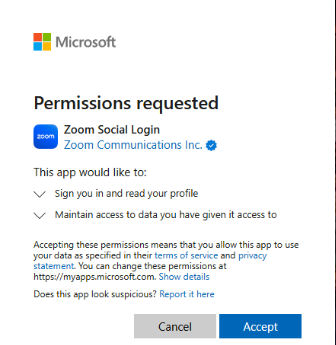
The example is another vendor's app, shown only to illustrate the verified badge. Completing verification removes the unverified warning from the NeuraFlow screen.